HRV, sleep and recovery,
computed on the phone.
Heart reads the R–R intervals off a Bluetooth heart-rate band and works out HRV, sleep stages, recovery and strain from them. There is no account, and no Heart server for your data to go to.
Coospo HW9 · Polar · Garmin · Wahoo · any 0x180D strap
v1.0.23 · Android 7.0+ · ~103 MB · free · what's new
Which bands work
Heart reads the standard Bluetooth Heart Rate Service (0x180D), so straps from other brands work too.
Coospo HW9
Worn on the chest, upper arm or forearm. This is the band I wear, and Heart was built and tested against it. It reports live heart rate, beat-to-beat intervals for HRV, and battery level.
Any standard Bluetooth strap
If it broadcasts the Bluetooth Heart Rate Service (0x180D), Heart can read it.
- Polar H9
- Polar H10
- Garmin HRM-Dual
- Wahoo TICKR
- and similar
A Heart user has confirmed the Polar H9 works. HRV needs beat-to-beat (RR) intervals: a strap that doesn't send them still gives live heart rate, and optical wrist sensors report them unevenly, so their HRV is coarser.
What it works out while you wear it
Sleep and recovery come from the overnight heart rate. Gym sessions start from your saved location. Walks, runs and rides you start yourself.
THE BRIEF
The Brief tab
The Brief shows a readiness score, a suggested focus for the day, your stress, today's strain and how far you've travelled. Below it, a Holt forecast guesses tomorrow night's HRV from the last one to two weeks. It needs five nights before it starts, and it wobbles.
- Readiness and recovery are measured against your last 30 nights
- Focus is one of push, maintain, easy or rest; strain is zone-weighted effort on a 0–21 scale
- Tap the distance line to see the day's route on a map
- Share the day's Brief as a Story image, with the reasons behind the score
SLEEP & RECOVERY
Sleep, from overnight heart rate
Wear the band to bed. Heart looks for sleep in the overnight heart rate, in 5-minute buckets, and splits the night into awake, light, deep and REM. The stager is a set of thresholds rather than a trained model, and it hasn't been checked against a sleep lab; if a night is clearly wrong, you can correct it. Overnight HRV (RMSSD) and resting heart rate feed the recovery score, which compares last night with your previous 30.
WORKOUTS
Gym sessions start when you arrive
Save your gym's location once. Stay inside the radius (250 m by default, 100–500 m in Settings) for two minutes wearing the band, and a Gym session starts. It ends a few minutes after you leave, or once the band has stopped sending for a while. Tag it Push, Pull or Legs and Heart keeps track of what you trained. Walks, runs and rides you start yourself, and they get a GPS route on an OpenStreetMap map.
A finished session can be shared as a Story image with a caption, for WhatsApp, email and the like. You pick what goes on it (heart rate, calories, times, route), and a route is cut off around the Home location you save.
FROM THE APP
Screenshots from my own phone, with my own data.
-
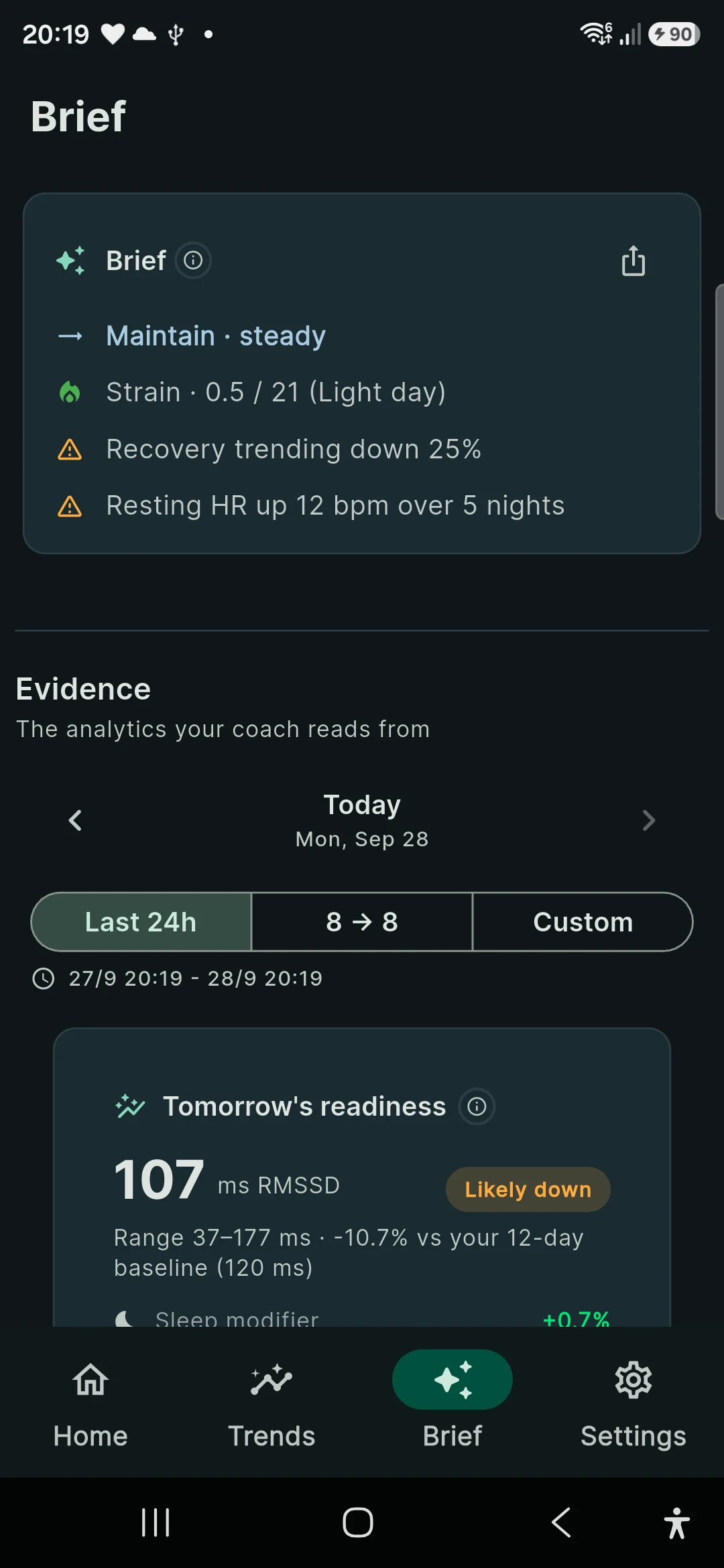
The Brief tab -
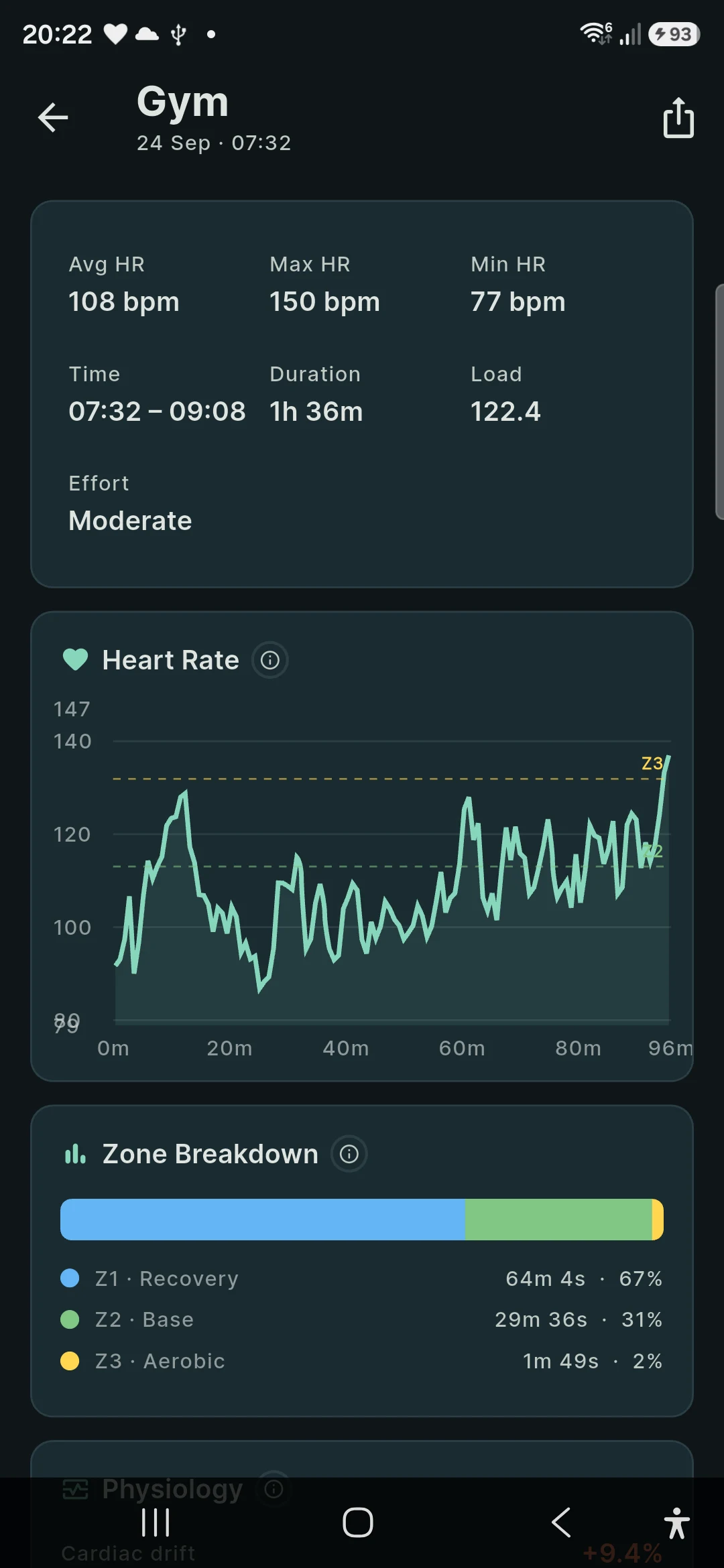
A gym session -
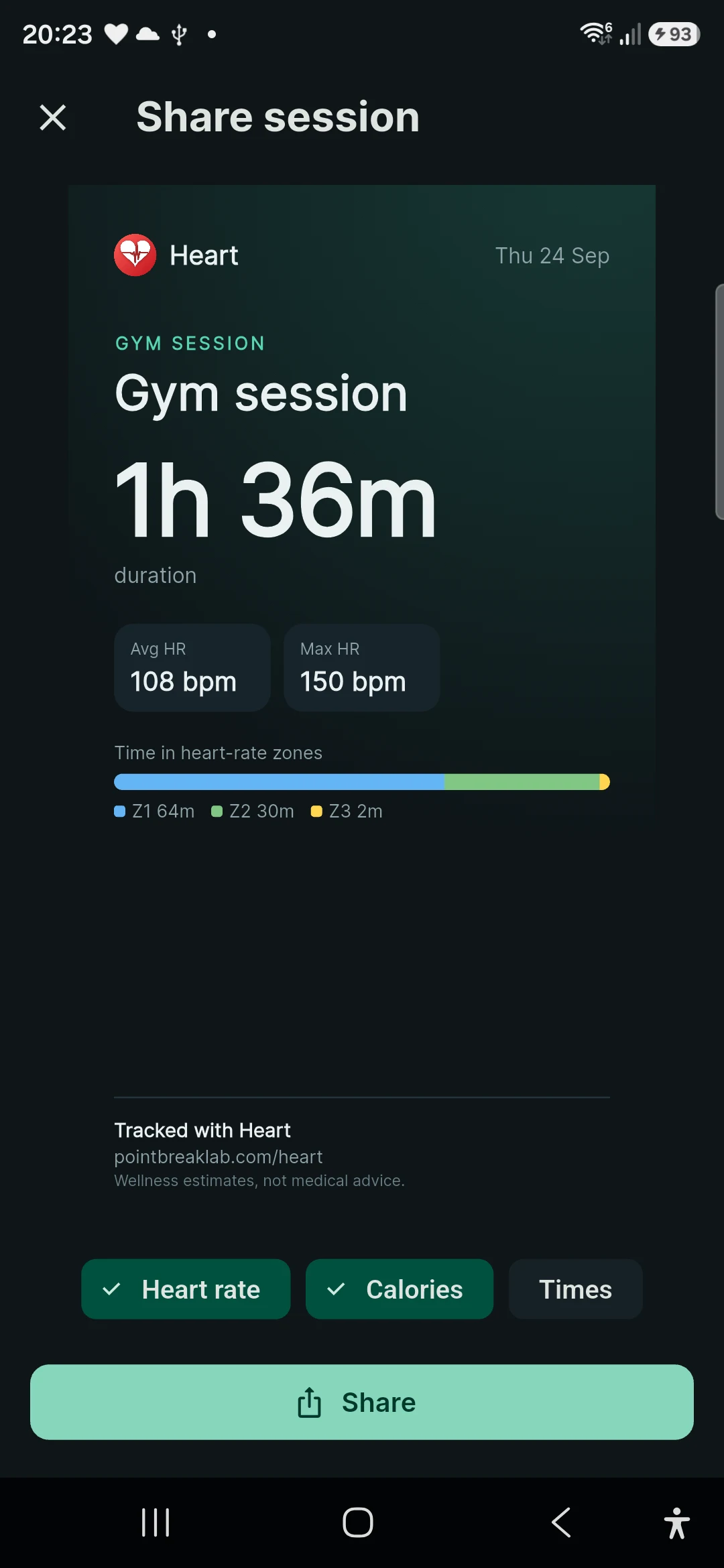
Sharing it as a Story
ALSO
-
Live heart rate & zones
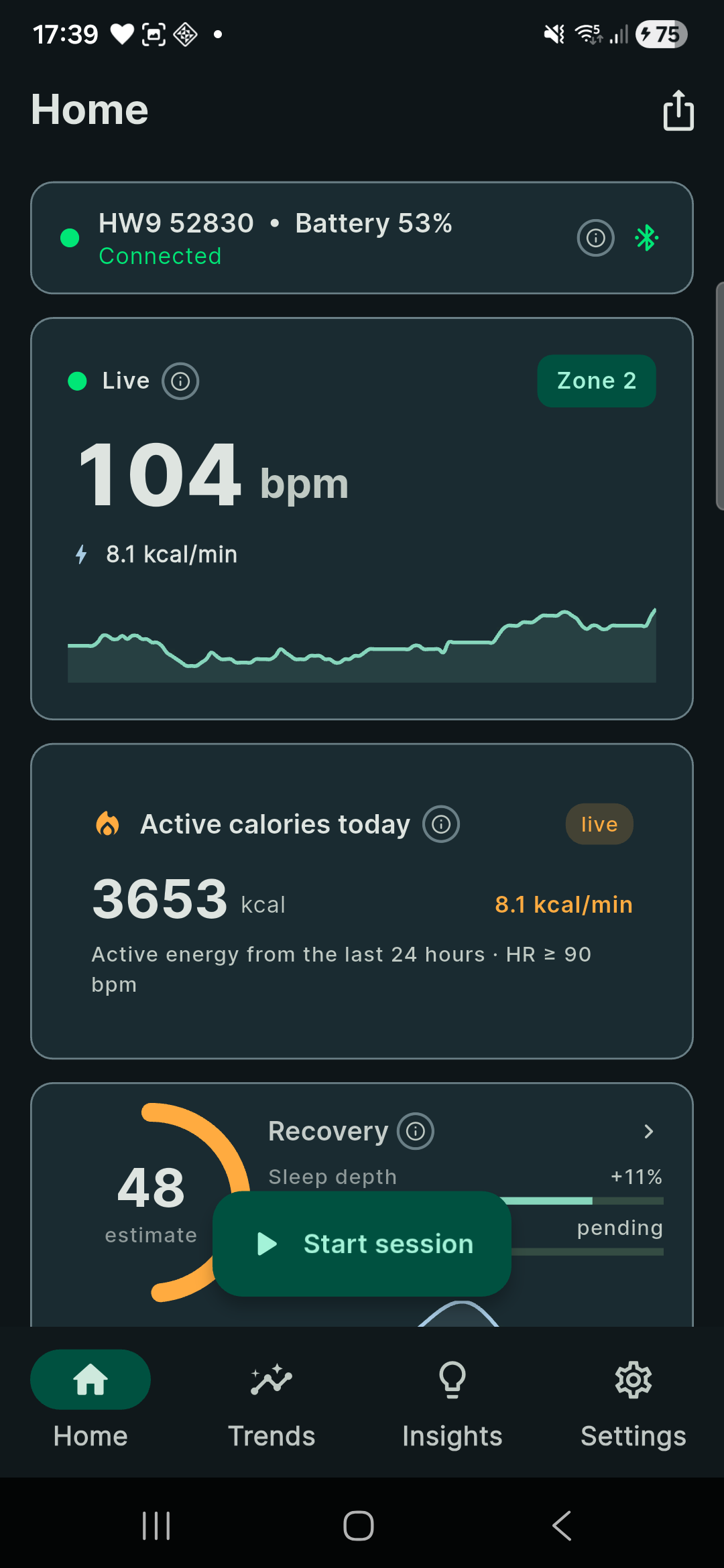
Your heart rate and current training zone, updating live on the Home screen.
-
HRV & resting heart rate
Overnight RMSSD and resting HR, charted over days and weeks next to your 30-day baseline.
-
Irregular-rhythm hints
Four RR features (pNN50, CoV, RMSSD, range). If three cross their thresholds for 30 seconds, Heart logs the stretch as worth a look. It is a wellness hint and cannot diagnose anything.
-
Active calories
Keytel 2005, counted only while your heart rate is at or above 90 bpm, where the formula holds. Below that it counts nothing, so this is active energy, not your whole day.
-
Location timeline
On by default, off in Settings. While the band is connected it logs a point at most every 2 minutes or 50 m, kept on the phone. Nothing is recorded within 150 m of the Home location you save.
-
Export and delete
Samples, scores, sleep history and the daily JSONL sit in the app sandbox. Export writes all of it into one JSON file, and delete-everything is one tap.
Download Heart
Android 7.0 or newer, no iPhone version. You also need a Bluetooth heart-rate strap: without one the app opens and has nothing to read.
First time installing an APK? Follow the install steps · privacy policy
WHAT'S NEW
All releases →V1.0.23 · THE CURRENT DOWNLOAD
Eight languages, the Brief, Story sharing, in-app updates, and gym sessions that end on time
Heart now speaks English, German, Chinese, Polish, Hindi, Spanish, Dutch and French. Pick one in Settings or let it follow your phone; numbers, dates and notifications follow the language too. Coach becomes the Brief: one card with today’s readiness, focus, stress, strain and how far you travelled. The coach chat and the optional AI model download are gone. You can share it, or any finished session, as a Story image for WhatsApp or email, with switches for what goes on it; a route is cut off around the Home location you save. Gym sessions start once you have been inside the radius for two minutes with the band on, and end a few minutes after you leave or when the band goes quiet, with a three-hour cap. If a gym session ends while you are still there with the band on, by mistake or otherwise, Heart picks the same session up again until you leave. Resting heart rate now comes only from your overnight minimum; it was being learned from gym sessions, which made a quiet stretch between sets look like rest and ended workouts after 20 minutes. Rows of 20-second gym sessions recorded before the band started streaming are cleaned up, and a workout that was cut in two is joined back into one. The old sessions that never ended get trimmed once, using your own location timeline. Every session now shows its own calories, and Home shows the whole day: resting metabolism so far plus active energy. Two calorie bugs are gone: a band dropout no longer counts as exercise, and resting energy is no longer counted twice. Effort looks at the whole session now, so an hour spent mostly in zone 1 reads Easy. The notification can show your live heart rate on the lock screen, and you can switch that off in Settings. Backups go to Download/Heart and survive an uninstall; after a reinstall Heart asks you to point it at that folder. Heart also checks pointbreaklab.com for new versions and installs them itself after checking the download’s checksum; from this version on you won’t need to come back here for updates. Also: a new launch screen, less lag, and fixes for a minimum heart rate of 0 bpm, a resting estimate of 0 bpm, an old heart rate shown as live, and a Load that differed between the list and the session.
Read the full changelog →Installing on Android
Heart comes as an APK file rather than from an app store, so Android asks a couple of extra questions the first time. These are the prompts people have run into so far.
-
Download the APK
Open this page in Chrome or Samsung Internet and tap Download APK. The file is called heart-android.apk.
-
Open the downloaded file
Tap the finished download in your notifications, or find it in My Files → Downloads.
-
Allow installs from that app
If Android says your browser or My Files isn't allowed to install apps, tap Settings, turn on Allow from this source (Install unknown apps), then go back and tap Install.
-
If Play Protect warns you
Play Protect may call Heart an unrecognised app, because it comes from outside the Play Store. Tap More details → Install anyway.
-
Open Heart and pair your band
Put the band on, open Heart and follow the pairing prompt. Allow the permissions it asks for so it can find your band.
SAMSUNG GALAXY
"Blocked by Auto Blocker"?
Samsung's Auto Blocker stops apps that don't come from an official app store. Open Settings → Security and privacy → Auto Blocker, turn it off, and install Heart. You can switch Auto Blocker back on once Heart is installed, but you'll need it off again for each update.
Download failed?
Try again in another browser, for example Samsung Internet instead of Chrome, or the other way round.
Updating to a new version
From 1.0.23, Heart checks for new versions itself and offers to download and install them; Android asks you to confirm. Otherwise, download the new APK and install it over the old one. Either way your data is kept, so there's no need to uninstall first.
What leaves your phone,
and what doesn't
Every score is computed on the phone. Heart has no server and no account, so your data only goes somewhere if you send it. The formulas are listed below with their sources.
- Compute
- Every score is calculated on the phone.
- Account
- None. There is nothing to sign up for.
- Server
- None. There is no Heart server to send data to.
- Telemetry
- None. No analytics and no ads.
- Network
- OpenStreetMap map tiles, and a check of pointbreaklab.com for a new Heart version at most every 12 hours (a small version file; switch it off in Settings). Only if you turn them on: Google Drive backup and phone-to-phone sync over your own Wi-Fi.
- Backups
- Written to Download/Heart on the phone, which is kept when Heart is uninstalled. After a reinstall you point Heart at that folder. Anything newer than the last backup is lost.
- Maths
- Published formulas, each with its source (list below).
VALIDATION · 14 ALGORITHMS · 92 TEST CASES · RUN 2026-09-28
Each closed-form algorithm in Heart gives the same output as a numpy reference implementation of the same formula, to within 1.42 × 10⁻¹⁴, which is floating-point rounding.
The check is a test in the app's repository (test/algorithm_validation_test.dart); the source isn't public. The formulas come from Tanaka 2001, Uth 2004, Keytel 2005, Holt 1957, ESC/NASPE 1996, Banister 1975 and Coyle 1998.
open this for the formulas
The validation above only checks that the maths is implemented correctly. It says nothing about end-to-end accuracy: sleep staging vs PSG and calories vs calorimetry haven't been independently measured yet.
Straps, iPhone, your data, installing
Do I need the Coospo HW9?
No. I built Heart around the Coospo HW9, which you can wear on the chest, upper arm or forearm, but any strap that sends the standard Bluetooth Heart Rate Service works, such as the Polar H9 and H10, Garmin HRM-Dual or Wahoo TICKR. A user has confirmed the Polar H9.
Is there an iPhone version?
No. Heart runs on Android 7.0 or newer only.
Does any of my data leave my phone?
Only what you choose to send. Every score is computed on the phone, and Heart has no account, server or telemetry. The app fetches OpenStreetMap map tiles and checks pointbreaklab.com for a new version at most every 12 hours (a small version file; nothing about you is sent, and you can switch it off). Google Drive backup and phone-to-phone sync over Wi-Fi only run if you turn them on.
What happens to my data if I uninstall or change phones?
Heart writes its backups to Download/Heart on the phone, and that folder is kept when you uninstall. After a reinstall, point Heart at that folder, or at a backup file you copied off the phone, and your history comes back. Nothing newer than the last backup comes back, so leave the automatic backups on. To update, install the new APK over the old one; your data is kept.
Do I need an account?
No. Accept the wellness disclaimer, pair your band, and it starts recording.
Is Heart a medical device?
No. Heart shows wellness estimates from a consumer-grade heart-rate band. They are not medical advice or a diagnosis. Irregular-rhythm hints in particular only mean something looked unusual; talk to a qualified healthcare professional about anything that worries you.
Why does Android warn me when I install it?
Heart is installed from an APK file rather than an app store, so Android asks you to confirm the source the first time. The install steps above cover the prompts people have run into, including Samsung Auto Blocker and Play Protect. See the install steps →
Heart shows wellness estimates from a consumer-grade heart-rate band. They are not medical advice or a diagnosis. Heart is a wellness application, not a medical device; consult a qualified healthcare professional for medical questions. Privacy policy